Loading manuals…
HyperX HX-HSCF-BK/AM manual
Cloud Flight · Headphones & headsets
2 documents in 5 languages
What's in the HyperX HX-HSCF-BK/AM user manual
From HyperX Cloud Flight (HX-HSCF-BK/AM) user manual · 166 pages · English. Tap a section to open the PDF at its page.
- Overviewp. 4
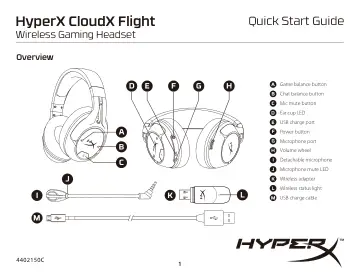
A. Game balance button B. Chat balance button C. Microphone mute button D. Ear cup LED E. USB charge port F. Power button G. Microphone port H. Volume wheel I.…
- Specificationsp. 5
Headphone Driver: Dynamic, 50mm with neodymium magnets Type: Circumaural, Closed back Frequency response: 20Hz–20,000Hz Impedance: 32 Ω Sound pressure level…
- Usagep. 6
Using with Xbox One® 1. Connect the wireless adapter to a USB port on the Xbox One® system. 2. Power on the headset. 3. When the wireless adapter status light…
- Using with Xbox One®p. 6
1. Connect the wireless adapter to a USB port on the Xbox One® system. 2. Power on the headset. 3. When the wireless adapter status light is solid, the headset…
- Headset Controlsp. 7
Power button Hold the power button for 3 seconds to power on/off the headset. With the headset powered on, short press the power button to cycle through the…
- Headset Status Beep Tone Indicatorsp. 9
The headset will emit beep tones to indicate status for power, volume, game/chat balance, microphone mute, mic monitoring, and battery charge. Power Status…