Loading manual…
MSI B560M PRO-VDH quick start guide
- Type
- Quick start guide
- Language
- English
- Pages
- 51
- Category
- Motherboards
- Models
- B560M PRO-VDHB560M PRO-VDH WIFI
Open PDFOpens the file on objects.icecat.biz.
Contents
- Quick Startp. 1
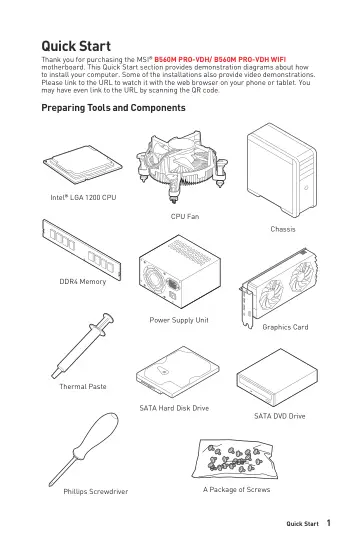
Thank you for purchasing the MSI® B560M PRO-VDH/ B560M PRO-VDH WIFI motherboard. This Quick Start section provides demonstration diagrams about how to install…
- Specificationsp. 15
CPU •Supports 10th Gen Intel® Core™ Processors, 11th Gen Intel® Core™ Processors, Pentium® Gold and Celeron® Processors* •Processor socket LGA1200 * Please go…
- Block Diagramp. 21
- Rear I/O Panelp. 22
LAN Port LED Status Table Link/ Activity LED Status Description Off No link Yellow Linked Blinking Data activity Speed LED Status Description Off 10 Mbps…
- Overview of Componentsp. 25
- Installing OS, Drivers & MSI Centerp. 40
Please download and update the latest utilities and drivers at www.msi.com Installing Windows® 10 1. Power on the computer. 2. Insert the Windows® 10…
- UEFI BIOSp. 41
MSI UEFI BIOS is compatible with UEFI (Unified Extensible Firmware Interface) architecture. UEFI has many new functions and advantages that traditional BIOS…
- Intel® Optane™ Memory Configurationp. 45
Intel® Optane™ memory is a technology which allows the system to access the data more quickly. It enables the computer to store commonly used data and…
- Troubleshootingp. 46
Before sending the motherboard for RMA repair, try to go over troubleshooting guide first to see if your got similar symptoms as mentioned below. The power is…
- CPU_FAN1, PUMP_FAN1, SYS_FAN1~2: Fan Connectorsp. 35
Fan connectors can be classified as PWM (Pulse Width Modulation) Mode or DC Mode. PWM Mode fan connectors provide constant 12V output and adjust fan speed with…
- CPU_PWR1, ATX_PWR1: Power Connectorsp. 33
- CPU Socketp. 27
When installing a CPU, always remember to install a CPU heatsink. A CPU heatsink is necessary to prevent overheating and maintain system stability. •Confirm…
- DIMM Slotsp. 28
DIMMA1 DIMMB1 Channel A Channel B DIMMA2 DIMMB2 Memory module installation recommendation ⚠ ⚠Important •Always insert memory modules in the DIMMA2 slot first.…
- JAUD1: Front Audio Connectorp. 32
- JBAT1: Clear CMOS (Reset BIOS) Jumperp. 37
There is CMOS memory onboard that is external powered from a battery located on the motherboard to save system configuration data. If you want to clear the…
- JCI1: Chassis Intrusion Connectorp. 36
This connector allows you to connect the chassis intrusion switch cable. Normal (default) Trigger the chassis intrusion event Using chassis intrusion detector…
- JCOM1: Serial Port Connectorp. 33
This connector allows you to connect the optional serial port with bracket.
- JDASH1 : Tuning Controller connectorp. 37
This connector is used to connect an optional Tuning Controller module. 1 2 6 5 1 No Pin 2 NC 3 MCU_SMB_SCL_M 4 MCU_SMB_SDA_M 5 VCC5 6 Ground
- JFP1, JFP2: Front Panel Connectorsp. 32
- JRAINBOW1: Addressable RGB LED connectorp. 39
The JRAINBOW connector allows you to connect the WS2812B Individually Addressable RGB LED strips 5V. JRAINBOW connector JRAINBOW connector System Fan connector…
- JRGB1: RGB LED connectorp. 38
- JTPM1: TPM Module Connectorp. 36
This connector is for TPM (Trusted Platform Module). Please refer to the TPM security platform manual for more details and usages. JCI1: Chassis Intrusion…
- JUSB1~2: USB 2.0 Connectorsp. 34
- JUSB3: USB 3.2 Gen 1 Connectorp. 34
This connector allows you to connect USB 3.2 Gen 1 5Gbps ports on the front panel. ⚠ ⚠Important Note that the Power and Ground pins must be connected correctly…
- M2_1~2: M.2 Slots (Key M)p. 30
M2_1 M2_2 ⚽ ⚽Video Demonstration Watch the video to learn how to Install M.2 SSD. https://youtu.be/2UeWMgjwogU Installing M.2 module 1. Loosen the screws of…
- PCI_E1~3: PCIe Expansion Slotsp. 29
BAT PCI_E1: PCIe 4.0 x16 (From CPU) PCI_E2: PCIe 3.0 x1 (From B560 chipset) PCI_E3: PCIe 3.0 x1 (From B560 chipset) ⚠ ⚠Important •If you install a large and…
- SATA1~6: SATA 6Gb/s Connectorsp. 29
These connectors are SATA 6Gb/s interface ports. Each connector can connect to one SATA device. SATA1 SATA3 SATA6 SATA2 SATA4 SATA5 ⚠ ⚠Important •Please do not…