Loading manual…
MSI MEG Z590 GODLIKE quick start guide
- Type
- Quick start guide
- Language
- English
- Pages
- 84
- Category
- Motherboards
- Models
- MEG Z590 GODLIKE
Open PDFOpens the file on objects.icecat.biz.
Contents
- Quick Startp. 1
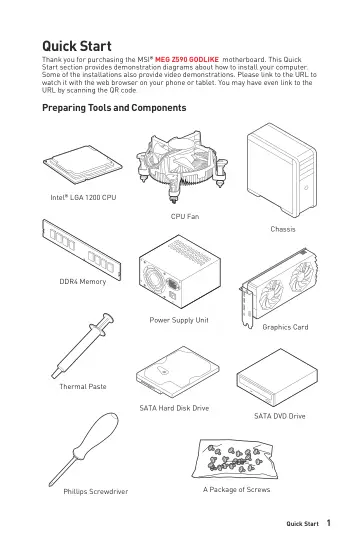
Thank you for purchasing the MSI® MEG Z590 GODLIKE motherboard. This Quick Start section provides demonstration diagrams about how to install your computer.…
- Specificationsp. 17
CPU •Supports 10th Gen Intel® Core™ Processors, 11th Gen Intel® Core™ Processors, Pentium® Gold and Celeron® Processors* •Processor socket LGA1200 * Please go…
- Block Diagramp. 27
- Rear I/O Panelp. 28
Clear CMOS button - Power off your computer. Press and hold the Clear CMOS button for about 5-10 seconds to reset BIOS to default values. •Flash BIOS Port/…
- Overview of Componentsp. 33
- Onboard LEDsp. 61
EZ Debug LED These LEDs indicate the debug status of the motherboard. CPU - indicates CPU is not detected or fail. DRAM - indicates DRAM is not detected or…
- Installing OS, Drivers & MSI Centerp. 69
Please download and update the latest utilities and drivers at www.msi.com Installing Windows® 10 1. Power on the computer. 2. Insert the Windows® 10…
- UEFI BIOSp. 70
MSI UEFI BIOS is compatible with UEFI (Unified Extensible Firmware Interface) architecture. UEFI has many new functions and advantages that traditional BIOS…
- Nahimic 3p. 74
is designed to offer the best audio experience it contains audio effects, microphone effects and Sound Tracker. Installation and Update Nahimic 3 is included…
- RAID Configurationp. 77
The introduction of RAID levels and types are as below: RAID 0 breaks the data into blocks which are written to separate hard drives. Spreading the hard drive…
- Intel® Optane™ Memory Configurationp. 78
Intel® Optane™ memory is a technology which allows the system to access the data more quickly. It enables the computer to store commonly used data and…
- Troubleshootingp. 79
Before sending the motherboard for RMA repair, try to go over troubleshooting guide first to see if your got similar symptoms as mentioned below. The power is…
- BIOS_SW1: Multi-BIOS Switchp. 56
This motherboard has two built-in BIOS ROMs. If one is crashed, you can shift to the other for booting by sliding the switch. BIOS B BIOS A (Default)…
- CPU_FAN1, PUMP_FAN1, SYS_FAN1~8: Fan Connectorsp. 54
Fan connectors can be classified as PWM (Pulse Width Modulation) Mode or DC Mode. PWM Mode fan connectors provide constant 12V output and adjust fan speed with…
- CPU_PWR1~2, ATX_PWR1, PCIE_PWR1: Power Connectorsp. 47
- CPU Socketp. 35
When installing a CPU, always remember to install a CPU heatsink. A CPU heatsink is necessary to prevent overheating and maintain system stability. •Confirm…
- DIMM Slotsp. 36
DIMMA1 DIMMB1 Channel A Channel B DIMMA2 DIMMB2 Memory module installation recommendation ⚠ ⚠Important •Always insert memory modules in the DIMMA2 slot first.…
- JAUD1: Front Audio Connectorp. 46
- JBAT1: Clear CMOS (Reset BIOS) Jumperp. 56
There is CMOS memory onboard that is external powered from a battery located on the motherboard to save system configuration data. If you want to clear the…
- JCI1: Chassis Intrusion Connectorp. 55
This connector allows you to connect the chassis intrusion switch cable. Normal (default) Trigger the chassis intrusion event Using chassis intrusion detector…
- JCORSAIR1: CORSAIR Connectorp. 59
The JCORSAIR1 connector allows you to connect the CORSAIR Individually Addressable Lighting PRO RGB LED strips 5V or CORSAIR RGB fans with the CORSAIR fan hub.…
- JDASH1 : Tuning Controller connectorp. 52
- JFP1, JFP2: Front Panel Connectorsp. 46
- JLN1~2: Low Temperature Booting Jumperp. 48
This jumper is used for liquid nitrogen cooling system to boot at an extreme low temperature. Try to set it Enabled to increase the boot success rate. Normal…
- JPWRLED1: LED power inputp. 61
This connector is used by retailers to demonstrate onboard LED lights. JPWRLED1 - LED power input XMP LED XMP LED This LED indicates the XMP (Extreme Memory…
- JRAINBOW1~2: Addressable RGB LED connectorsp. 58
The JRAINBOW connectors allow you to connect the WS2812B Individually Addressable RGB LED strips 5V. JRAINBOW connector JRAINBOW connector System Fan connector…
- JRGB1: RGB LED connectorp. 57
- JSLOW1: Slow Mode Booting Jumperp. 48
This jumper is used for LN2 cooling solution, that provides the extreme overclocking conditions, to boot at a stable processor frequency and to prevent the…
- JTPM1: TPM Module Connectorp. 51
This connector is for TPM (Trusted Platform Module). Please refer to the TPM security platform manual for more details and usages.
- JUSB1: USB 3.2 Gen 2 Type-C Connectorp. 50
This connector allows you to connect USB 3.2 Gen 2 Type-C connector on the front panel. The connector possesses a foolproof design. When you connect the cable…