Loading manual…
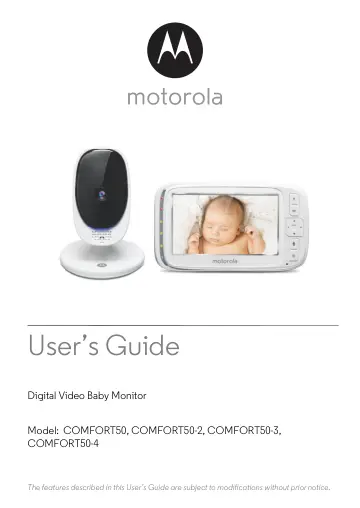
Motorola comfort50 user manual
- Type
- User manual
- Language
- English
- Pages
- 30
- Category
- Baby care
- Models
- COMFORT50
Open PDFOpens the file on objects.icecat.biz.
Contents
- 1. Safety Instructionsp. 7
WARNING: Strangulation Hazard: Children have STRANGLED in cords. Keep this cord out of the reach of children (more than 3ft away). Do not remove this tag.…
- 2. Getting Startedp. 10
2.1 Power up the Baby Unit 1. Insert the small end (USB) of the Baby Unit’s power adapter (Output 5V, 600mA) into the USB socket in the back of the Baby Unit.…
- 2.1 Power up the Baby Unitp. 10
1. Insert the small end (USB) of the Baby Unit’s power adapter (Output 5V, 600mA) into the USB socket in the back of the Baby Unit. 2. Insert the other end of…
- 2.2 Charge the Parent Unitp. 11
The Parent Unit comes with a built-in Li-ion battery. Charge the battery in the Parent Unit for at least 16 hours before using it for the first time or when…
- 3. Using the Baby Monitorp. 12
Please read these instructions carefully, and be aware that this baby monitor is only intended as an aid. It is not a substitute for responsible adult…
- 3.1 Setting Upp. 12
Make sure that the Baby Unit and Parent Unit are both switched on. • Place the Baby Unit in a convenient location (e.g. on a table) and point the camera lens…
- 3.2 Power On or Off the Baby Unitp. 12
Slide the ON/OFF switch 0 to the ON position to switch on the Baby Unit. The power indicator lights up in blue. Slide the ON/OFF switch 0 to the OFF position…
- 3.3 Power On or Off the Parent Unitp. 12
Press and hold the power button 0 to switch on the Parent Unit. The power indicator lights up in green. Press and hold the power button 0 to switch off the…
- 3.4 Night Vision Modep. 13
The Baby Unit has high-intensity infrared LEDs for picking up clear images in the dark. When the built-in light sensor on the side of the Baby Unit detects a…
- 4. Parent Unit Menu Optionsp. 14
4.1 Adjust Speaker Volume The Parent Unit has 8 volume levels + off. To adjust volume, press the + UP or - DOWN button when the Parent Unit is in camera…
- 4.1 Adjust Speaker Volumep. 14
The Parent Unit has 8 volume levels + off. To adjust volume, press the + UP or - DOWN button when the Parent Unit is in camera viewing mode
- 4.2 Set the Screen Brightnessp. 14
The Parent Unit has 8 brightness levels. To adjust brightness, press the < LEFT or > RIGHT button when the Parent Unit is in camera viewing mode
- 4.3 Adjust Settingsp. 14
You can adjust the following settings on the Parent Unit: zoom function, lullabies, alarm, video on timer, add/delete/ view camera and alternating camera…
- 4.3.1 Zoom and Panp. 14
You can zoom in or out when viewing the image on the Parent Unit. 1. Press the M MENU button when the Parent Unit is in camera viewing mode. 2. Press the <…
- 4.3.2 Set lullabyp. 15
You can select one or all the 5 lullabies to play over the Baby Unit (Camera). To activate lullaby, proceed as follows: 1. Press the M MENU button when the…
- 4.3.3 Set alarmp. 15
You can use the Parent Unit to set an alarm as a reminder for you to take care of your baby. If an alarm time is selected, the Parent Unit will beep at the end…
- 4.3.4 Screen off timerp. 15
You can set the screen off time for the Parent Unit after it is in idle mode for a specific time interval (5 mins, 15 mins or 30 mins). When the screen is…
- 4.3.5 Add camerap. 16
You can connect one Parent Unit with up to four cameras. To add a compatible camera to the Parent Unit, proceed as follows: 1. Press the M MENU button when the…
- 4.3.6 Delete camerap. 16
If you wish to delete the connection to a camera, proceed as follows: 1. Press the M MENU button when the Parent Unit is in camera viewing mode. 2. Press the <…
- 4.3.7 View camerap. 17
If you have more than one camera paired with the Parent Unit, to select the transmission image from a specific camera, proceed as follows: 1. Press the M MENU…
- 4.3.8 Switch camera viewp. 17
The “switch camera view” function is available if you have multiple cameras paired with the Parent Unit. When the Parent Unit is in camera viewing mode, press…
- 4.3.9 Two-way communicationp. 17
The Parent Unit has a two-way communication function. To activate two-way communication function, hold down the button on the Parent Unit and speak into the…
- 5. Disposal of the Device (environment)p. 18
At the end of the product’s life cycle, you should not dispose of this product with normal household waste. Take this product to a collection point for the…
- 6. Cleaningp. 19
Clean your Baby Monitor with a slightly damp or anti-static cloth. Never use cleaning agents or abrasive solvents. Cleaning and care • Do not clean any part of…
- 7. Troubleshootingp. 20
Power Indicator on the Parent Unit does not come on • Check whether the Parent Unit is powered on. • Check whether the battery is charged. • Recharge the…
- 8. General Informationp. 22
lf your product is not working properly.... 1. Read this User’s Guide or the Quick Start Guide. 2. Visit our website: www.motorolahome.com/support 3. Contact…
- 9. Technical Specificationsp. 28
Baby Unit Frequency 2.4 - 2.483 GHz Image sensor Color CMOS 1M Pixels IR LED 8 pcs Power Adapter: Zhongshan Baolijin Electronic Co.,Ltd. BLJ06W050060P1-U…