Loading manual…
MSI X470 Gaming Pro Carbon AC user manual
- Type
- User manual
- Language
- English
- Pages
- 116
- Category
- Motherboards
- Models
- X470 GAMING PRO CARBON AC
Open PDFOpens the file on objects.icecat.biz.
Contents
- Unpackingp. 1
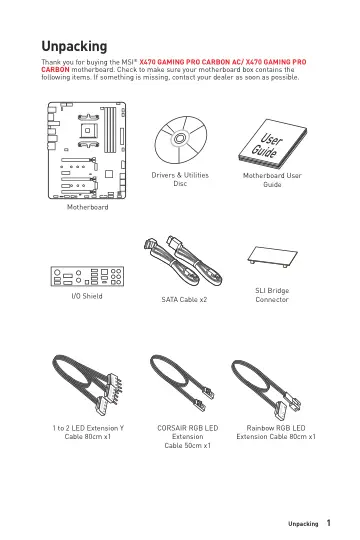
to 2 LED Extension Y Cable 80cm x1 Unpacking Thank you for buying the MSI® X470 GAMING PRO CARBON AC/ X470 GAMING PRO CARBON motherboard. Check to make sure…
- Safety Informationp. 3
y The components included in this package are prone to damage from electrostatic discharge (ESD). Please adhere to the following instructions to ensure…
- Quick Startp. 4
DDR4 Memory Graphics Card SATA Hard Disk Drive SATA DVD Drive A Package of Screws Phillips Screwdriver Chassis Power Supply Unit CPU Fan Thermal Paste Quick…
- Specificationsp. 18
CPU Supports AMD® RyzenTM Desktop processors and A-series/ Athlon™ processors for Socket AM4 Chipset AMD® X470 Chipset Memory y 4x DDR4 memory slots, support…
- Block Diagramp. 24
- Rear I/O Panelp. 25
USB 3.1 Gen2 Type-C Link/ Activity LED Status Description Off No link Yellow Linked Blinking Data activity Speed LED Status Description Off 10 Mbps connection…
- Overview of Componentsp. 29
- Onboard LEDsp. 45
PCI_E1 LED PCI_E3 LED PCI_E5 LED DIMM LEDs These LEDs indicate the memory modules are installed. PCIe x16 slot LEDs These LEDs indicate the PCIe x16 slots…
- BIOS Setupp. 47
The default settings offer the optimal performance for system stability in normal conditions. You should always keep the default settings to avoid possible…
- Software Descriptionp. 68
Please download and update the latest utilities and drivers at www.msi.com Installing Windows® 10 1. Power on the computer. 2. Insert the Windows® 10 disc into…
- RAID Configurationp. 101
Below are the different types of a RAID. RAID 0 breaks the data into blocks which are written to separate hard drives. Spreading the hard drive I/O load across…
- Troubleshootingp. 112
Before sending the motherboard for RMA repair, try to go over troubleshooting guide first to see if your got similar symptoms as mentioned below. The power is…
- Regulatory Noticesp. 113
FCC Compliance Statement Note: This equipment has been tested and found to comply with the limits for a Class B digital device, pursuant to part 15 of the FCC…
- CPU_FAN1, PUMP_FAN1, SYS_FAN1~4: Fan Connectorsp. 40
Fan connectors can be classified as PWM (Pulse Width Modulation) Mode or DC Mode. PWM Mode fan connectors provide constant 12V output and adjust fan speed with…
- CPU_PWR1~2, ATX_PWR1: Power Connectorsp. 38
These connectors allow you to connect an ATX power supply.
- DIMM Slotsp. 32
- JAUD1: Front Audio Connectorp. 41
- JBAT1: Clear CMOS (Reset BIOS) Jumperp. 42
There is CMOS memory onboard that is external powered from a battery located on the motherboard to save system configuration data. If you want to clear the…
- JCI1: Chassis Intrusion Connectorp. 41
This connector allows you to connect the chassis intrusion switch cable. Normal (default) Trigger the chassis intrusion event Using chassis intrusion detector…
- JCORSAIR1: CORSAIR Connectorp. 44
The JCORSAIR1 connector allows you to connect the CORSAIR Individually Addressable Lighting PRO RGB LED strips 5V or CORSAIR RGB fans with the CORSAIR fan hub.…
- JFP1, JFP2: Front Panel Connectorsp. 37
- JRGB1~2, JRAINBOW1: RGB LED connectorsp. 43
The JRGB1/2 connectors allow you to connect the 5050 RGB LED strips 12V. The JRAINBOW1 connector allows you to connect the WS2812B Individually Addressable RGB…
- JTPM1: TPM Module Connectorp. 42
This connector is for TPM (Trusted Platform Module). Please refer to the TPM security platform manual for more details and usages. JBAT1: Clear CMOS (Reset…
- JUSB1~2: USB 2.0 Connectorsp. 39
- JUSB3~4: USB 3.1 Gen1 Connectorsp. 39
These connectors allow you to connect USB 3.1 Gen1 ports on the front panel. Important Note that the Power and Ground pins must be connected correctly to avoid…
- M2_1~2: M.2 Slots (Key M)p. 36
M2_1 M2_2 Video Demonstration Watch the video to learn how to use M.2 Shield. https://youtu.be/NwtQBpkUazs 1 2 3 30° Installing M.2 SSD 1. Loosen the M.2 riser…
- PCI_E1~5: PCIe Expansion Slotsp. 33
PCI_E1: PCIe 3.0 x16*/ PCIe 3.0 x8** PCI_E2: PCIe 2.0 x1 PCI_E3: PCIe 3.0 x8*/ Unavailable** PCI_E4: PCIe 2.0 x1 PCI_E5: PCIe 2.0 x4 Multiple graphics cards…
- Processor Socketp. 31
Important y When changing the processor, the system configuration could be cleared and reset BIOS to default values, due to the AM4 processor’s architecture. y…
- SATA1~8: SATA 6Gb/s Connectorsp. 37
These connectors are SATA 6Gb/s interface ports. Each connector can connect to one SATA device. SATA7 SATA5 SATA3 SATA8 SATA6 SATA4 SATA2 SATA1 Important y…