Loading manual…
MSI A320M PRO-M2 V2 user manual
- Type
- User manual
- Language
- English
- Pages
- 164
- Category
- Ovens & ranges
- Models
- JLED1
Open PDFOpens the file on objects.icecat.biz.
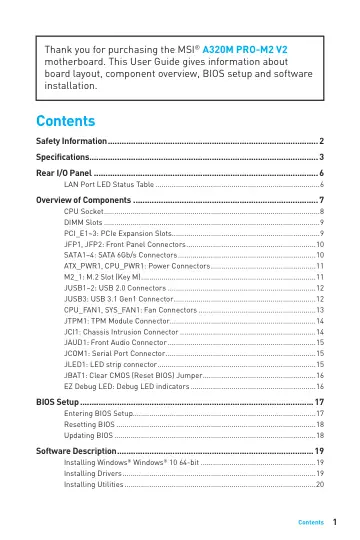
Contents
- Safety Informationp. 2
y The components included in this package are prone to damage from electrostatic discharge (ESD). Please adhere to the following instructions to ensure…
- Specificationsp. 3
CPU Supports AMD® Ryzen 1st and 2nd Generation/ Ryzen™ with Radeon™ Vega Graphics/ Athlon™ with Radeon™ Vega Graphics and A-series / Athlon™ X4 Processors for…
- Rear I/O Panelp. 6
Link/ Activity LED Status Description Off No link Yellow Linked Blinking Data activity Speed LED Status Description Off 10 Mbps connection Green 100 Mbps…
- LAN Port LED Status Tablep. 6
Audio 7.1-channel Configuration To configure 7.1-channel audio, you have to connect front audio I/O module to JAUD1 connector and follow the below steps. 1.…
- Overview of Componentsp. 7
- CPU Socketp. 8
Please install the CPU into the CPU socket as shown below. Important y When changing the processor, the system configuration could be cleared and reset BIOS to…
- DIMM Slotsp. 9
Please install the memory module into the DIMM slot as shown below. Important y Due to chipset resource usage, the available capacity of memory will be a…
- PCI_E1~3: PCIe Expansion Slotsp. 9
Important y When adding or removing expansion cards, always turn off the power supply and unplug the power supply power cable from the power outlet. Read the…
- JFP1, JFP2: Front Panel Connectorsp. 10
- SATA1~4: SATA 6Gb/s Connectorsp. 10
These connectors are SATA 6Gb/s interface ports. Each connector can connect to one SATA device. SATA1 SATA2 SATA3 SATA4 Important y Please do not fold the SATA…
- ATX_PWR1, CPU_PWR1: Power Connectorsp. 11
- JUSB3: USB 3.1 Gen1 Connectorp. 12
- CPU_FAN1, SYS_FAN1: Fan Connectorsp. 13
Fan connectors can be classified as PWM (Pulse Width Modulation) Mode or DC Mode. PWM Mode fan connectors provide constant 12V output and adjust fan speed with…
- JTPM1: TPM Module Connectorp. 14
This connector is for TPM (Trusted Platform Module). Please refer to the TPM security platform manual for more details and usages. 1 2 14 13 1 LPC Clock 2 3V…
- JAUD1: Front Audio Connectorp. 15
- JBAT1: Clear CMOS (Reset BIOS) Jumperp. 16
There is CMOS memory onboard that is external powered from a battery located on the motherboard to save system configuration data. If you want to clear the…
- EZ Debug LED: Debug LED indicatorsp. 16
These LEDs indicate the status of the motherboard. CPU - indicates CPU is not detected or fail. DRAM - indicates DRAM is not detected or fail. VGA - indicates…
- BIOS Setupp. 17
The default settings offer the optimal performance for system stability in normal conditions. You should always keep the default settings to avoid possible…
- Entering BIOS Setupp. 17
Press Delete key, when the Press DEL key to enter Setup Menu, F11 to enter Boot Menu message appears on the screen during the boot process. Function key F1…
- Resetting BIOSp. 18
You might need to restore the default BIOS setting to solve certain problems. There are several ways to reset BIOS: y Go to BIOS and press F6 to load optimized…
- Updating BIOSp. 18
with M-FLASH Before updating: Please download the latest BIOS file that matches your motherboard model from MSI website. And then save the BIOS file into the…
- Software Descriptionp. 19
Please download and update the latest utilities and drivers at www.msi.com
- Installing Windows® Windows® 10 64-bitp. 19
1. Power on the computer. 2. Insert the Windows® 10 disc into your optical drive. 3. Press the Restart button on the computer case. 4. Press F11 key during the…
- Installing Driversp. 19
1. Start up your computer in Windows® 10. 2. Insert MSI® Driver Disc into your optical drive. 3. The installer will automatically appear and it will find and…
- Installing Utilitiesp. 20
Before you install utilities, you must complete drivers installation. 1. Insert MSI® Driver Disc into your optical drive. 2. The installer will automatically…