Loading manual…
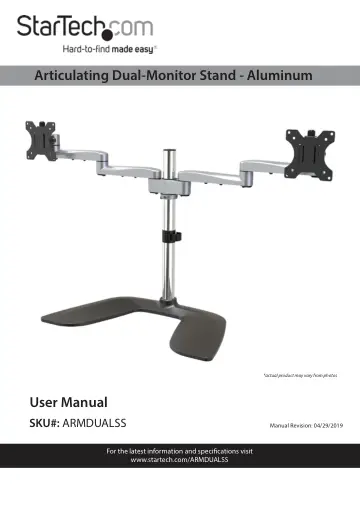
StarTech.com Dual Monitor Stand (ARMDUALSS) user manual
- Type
- User manual
- Language
- English
- Pages
- 28
- Category
- Monitors
- Models
- ARMDUALSS
Open PDFOpens the file on objects.icecat.biz.
Contents
- Product Diagramp. 9
- Dimensionsp. 9
- Front Viewp. 10
- Rear Viewp. 11
Shoulder 6 Cable-Management Clip 5 6
- Side Viewp. 12
Height-Adjustment Lever 7
- Technical Specificationsp. 13
Type of Measurement Measurement VESA Mounting Hole Pattern 75x75 100x100 Weight Capacity Up to 17.6 lb. (8 kg) Per Monitor Tilt +900 to -400 Maximum Screen…
- Requirementsp. 14
For the latest requirements, please visit www.StarTech.com/ARMDUALSS. • Two Monitors Note: Both Monitors must conform to the size, weight, and VESA pattern…
- Assemblyp. 15
Warning! Make sure that all of the hardware is assembled securely and checked for stability before you load the Monitors. Warning! Make sure that the weight of…
- Assemble the Basep. 15
1. Loosen the Hex Screws that are located on the Base using the 3 mm Hex Key. 2. Slide the Cable-Management Clip onto the Pole. 3. Screw the Pole into the…
- Adjust the Collarp. 16
1. Loosen the Flat-Head Screws on the Collar, using the 3 mm Hex Key with Screwdriver Tip. 2. Slide the Collar up or down the Pole so that it sits at the…
- Attach the Shoulderp. 17
1. Rotate the Lever on the Shoulder counterclockwise to loosen the Shoulder. Note: The Lever has a ratchet feature. Freely rotate the Lever by pulling it away…
- Attach the Swivel Armsp. 18
1. Insert the Swivel Arms into the Sockets of the Shoulder until each Swivel Arm clicks into place. (Figure 4) To remove the Swivel Arms: Release the Clip that…
- Attach the VESA Mounts to the Monitorsp. 20
ARMDUALSS is designed to be used with Monitors that are the same size and weight. If you attach Monitors that are different sizes and weights to ARMDUALSS, you…
- Attach the VESA Mounts to the Swivel Armsp. 22
Note: A second person may be required to complete the following steps. 1. Lift the Monitor that will be positioned on the left-hand side and position it over…
- Adjusting the Monitorsp. 23
Warning! The most stable configuration of ARMDUALSS is the “flat” position, with both of the Swivel Arms positioned in a straight line. ARMDUALSS can become…
- Tilt Adjustmentp. 23
The Monitors can be tilted to accommodate different viewing angles (40 degrees downward or 90 degrees upward). 1. Loosen the Hex Screw on the side of each VESA…
- Swivel Adjustmentp. 24
The Monitors can be adjusted on a 90-degree swivel. • Place both of your hands on either side of the Monitor and apply light pressure either left or right
- Micro Height Adjustmentp. 24
1. Insert the 6 mm Hex Key into the Height-Adjustment Lever that is located on the top of the VESA Mounts. 2. Turn the 6 mm Hex Key, or the Height-Adjustment…
- Cable Managementp. 25
The Power and Video Cables from your Monitors can be organized and contained within the Swivel Arms and alongside the Pole. To manage the Cables running to…