Loading manual…
DYMO LetraTag LT-100H Handheld Label Maker | ABC Keyboard Label Printer (S0883990) user manual
- Type
- User manual
- Language
- English
- Pages
- 20
- Category
- Keyboards & mice
- Models
- S0883990
Open PDFOpens the file on objects.icecat.biz.
Contents
- About Your New Labelmakerp. 2
With your new DYMO LetraTag™ labelmaker, you can create a wide variety of high-quality, self-adhesive labels. You can choose to print your labels in many…
- Getting Startedp. 2
Follow the instructions in this section to print your first label. Connecting the Power The labelmaker is powered by standard batteries. To save power, the…
- Getting to Know the Labelmakerp. 6
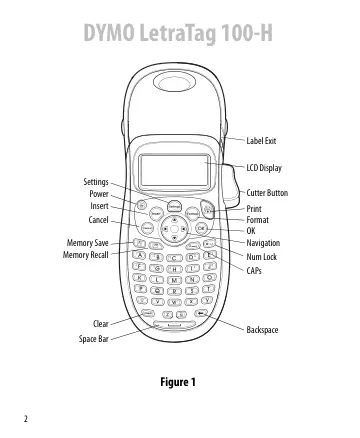
Become familiar with the location of the feature and function keys on your labelmaker. Refer to Figure 1 on the inside front cover. The following sections…
- Formatting Your Labelp. 9
You can choose from a number of formatting options to enhance the appearance of your labels. Changing the Font Size Five font sizes are available for your…
- Using Symbols and Special Charactersp. 13
Symbols and other special characters can be added to your labels. Adding Symbols The labelmaker supports the extended symbol set shown below.
- Printing Optionsp. 15
You can preview your label and adjust the printing contrast. Previewing Your Label You can preview the text or format of your label prior to printing. A…
- Using Labelmaker Memoryp. 16
The labelmaker has a powerful memory feature that allows you to store the text of up to nine labels you use frequently. Storing Label Text You can store up to…
- Caring for Your Labelmakerp. 17
Your labelmaker is designed to give you long and trouble-free service, while requiring very little maintenance. Clean your labelmaker from time to time to keep…
- Troubleshootingp. 18
Review the following possible solutions if you encounter a problem while using your labelmaker. Problem/Error Message Solution No display • Ensure the…