Loading manual…
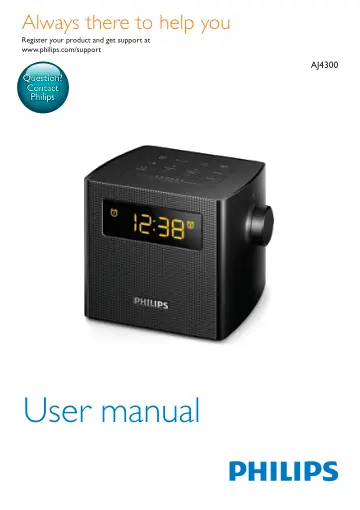
Philips Clock Radio AJ4300B/12 user manual
- Type
- User manual
- Language
- English
- Pages
- 14
- Category
- Radios
- Models
- AJ4300AJ4300B/12
Open PDFOpens the file on objects.icecat.biz.
Contents
- 1 Importantp. 4
Safety Warning • Never remove the casing of this clock radio. • Never lubricate any part of this clock radio. • Never place this clock radio on other…
- Safetyp. 4
Warning • Never remove the casing of this clock radio. • Never lubricate any part of this clock radio. • Never place this clock radio on other electrical…
- 2 Your clock radiop. 5
Congratulations on your purchase, and welcome to Philips! To fully benefit from the support that Philips offers, register your product at…
- Introductionp. 5
With this clock radio, you can: • listen to FM radio; • set two alarms, and • wake up to buzzer or radio
- What's in the boxp. 5
Check and identify the contents of your package: • Clock radio • Short User Manual • Safety & notice leaflet
- Overview of the clock radiop. 5
- 3 Get startedp. 7
Always follow the instructions in this chapter in sequence
- Install batteryp. 7
Caution • Risk of explosion! Keep batteries away from heat, sunshine or fire. Never discard batteries in fire. • Danger of explosion if batteries are…
- Connect powerp. 7
Caution • Risk of product damage! Make sure that the power voltage corresponds to the voltage printed on the back or underside of the clock radio. • Risk of…
- Set clockp. 7
Press SET TIME to activate clock setting mode. » » The hour and minute digits blink. 2 Press + TUNING/ HR - to set hour. 3 Press + PRESET/ MIN - to set minute.…
- 4 Listen to FM radiop. 8
Tune to FM radio stations Tip • Position the antenna as far as possible from any electrical appliances. • For better reception, fully extend and adjust the…
- Tune to FM radio stationsp. 8
Tip • Position the antenna as far as possible from any electrical appliances. • For better reception, fully extend and adjust the position of the antenna. 1…
- Store FM radio stations automaticallyp. 8
In FM tuner mode, press SCAN. » » The clock radio stores all the available FM radio stations, and then broadcasts the first available station automatically
- Store FM radio stations manuallyp. 8
Note • You can store a maximum of 20 FM radio stations. 1 In FM tuner mode, tune to an FM radio station. 2 Press PROG. » » The preset number begins to blink. 3…
- Select a preset radio stationp. 8
In FM tuner mode, press + PRESET/ MIN - repeatedly to select a preset radio station
- Adjust volumep. 8
Rotate the VOL knob to increase or decrease the volume level.
- 5 Set alarm timerp. 9
Set alarm You can set two alarms to ring at different time. Note • Make sure that the clock is set correctly. 1 Press and hold or for two seconds to activate…
- Set alarmp. 9
timer Set alarm You can set two alarms to ring at different time. Note • Make sure that the clock is set correctly. 1 Press and hold or for two seconds to…
- Activate/deactivate alarm timerp. 9
Press or repeatedly to activate or deactivate the alarm timer. » » or appears if the alarm timer is on and disappears if it is off. • To stop the alarm, press…
- Snooze the alarmp. 9
When alarm sounds, press SNOOZE. » » The alarm snoozes and repeats ringing nine minutes later.
- 6 Other featuresp. 10
Set sleep timer This clock radio can switch to standby mode automatically after a preset period. • Press repeatedly to select the sleep timer period (in…
- Set sleep timerp. 10
This clock radio can switch to standby mode automatically after a preset period. • Press repeatedly to select the sleep timer period (in minutes). To…
- Charge your devicep. 10
With this clock radio, you can charge your external devices, such as your cell phone, MP3 player or other mobile devices. • Use a USB cable (not supplied) to…
- Adjust display brightnessp. 10
Press BRIGHTNESS repeatedly to select different brightness levels.
- 7 Product informationp. 11
Note • Product information is subject to change without prior notice
- Specificationsp. 11
Amplifier Rated Output Power 0.5 W RMS Tuner Tuning Range (FM) 87.5 - 108 MHz Tuning Grid 50 KHz Search Selectivity <28 dBf Total Harmonic Distortion <3%…
- 8 Troubleshootingp. 12
Warning • Never remove the casing of this device. To keep the warranty valid, never try to repair the system yourself. If you encounter problems when using…
- 9 Noticep. 13
Any changes or modifications made to this device that are not expressly approved by Gibson Innovations may void the user’s authority to operate the equipment.…