Loading manual…
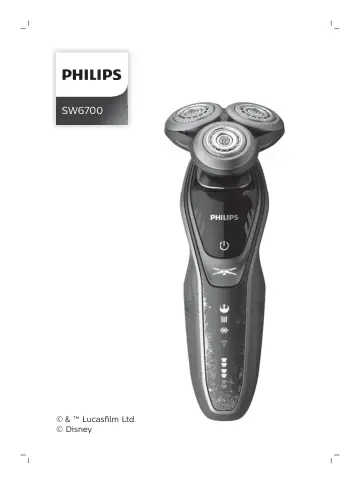
Philips Special Edition Poe Men’s Electric Shaver SW6700/14 user manual
Open PDFOpens the file on objects.icecat.biz.
Contents
- Introductionp. 6
Congratulations on your purchase and welcome to Philips! To fully benefit from the support that Philips offers, register your product at…
- General description (Fig. 1)p. 6
Click-on precision trimmer attachment 2 Shaving unit with hair chamber 3 On/off button 4 Turbo+ button 5 Replacement reminder 6 Cleaning reminder 7 Travel lock…
- Important safety informationp. 6
Read this important information carefully before you use the appliance and its accessories and save it for future reference. The accessories supplied may vary…
- The displayp. 11
Start-up sequence When you press the on/off button for the very first time, all display indications light up in sequence. Charge the shaver before use. Battery…
- Chargingp. 13
Charge the shaver before you use it for the first time and when the display indicates that the battery is almost empty. Charging takes approx. 1 hour. A fully…
- Using the shaverp. 14
Always check the shaver and all accessories before use. Do not use the shaver or any accessory if it is damaged, as this may cause injury. Always replace a…
- Using click-on attachmentsp. 17
Removing or attaching the click-on attachment 1 Make sure the shaver is switched off. 2 Pull the attachment straight off the shaver. Note: Do not twist the…
- Travel lockp. 18
You can lock the shaver when you are going to travel. The travel lock prevents the shaver from being switched on by accident. Activating the travel lock 3 sec.…
- Cleaning and maintenancep. 19
Regular cleaning guarantees better shaving results. Never clean, remove or replace the shaving unit while the shaver is switched on. Do not apply pressure to…
- Replacementp. 21
Replacing the shaving heads For maximum shaving performance, we advise you to replace the shaving heads every two years. Replace damaged shaving heads…
- Storagep. 23
Store the shaver in the pouch. Note: Always let the shaver dry before you store it in the pouch
- Ordering accessoriesp. 23
To buy accessories or spare parts, visit www.shop.philips.com/service or go to your Philips dealer. You can also contact the Philips Consumer Care Center in…
- Recyclingp. 24
This symbol means that this product shall not be disposed of with normal household waste (2012/19/EU). - This symbol means that this product contains a…
- Removing the rechargeable shaver batteryp. 24
Only remove the rechargeable battery when you discard the shaver. Before you remove the battery, make sure that the shaver is disconnected from the wall socket…
- Warranty and supportp. 25
If you need information or support, please visit www.philips.com/support or read the international warranty leaflet. Warranty restrictions The shaving heads…
- Troubleshootingp. 25
Shaver Problem Possible cause Solution The appliance does not work when I press the on/off button. The appliance is still attached to the wall socket. For…
- Introduktionp. 28
Tillykke med dit køb, og velkommen til Philips! For at få fuldt udbytte af den support, Philips tilbyder, skal du registrere dit produkt på…
- Generel beskrivelse (fig. 1)p. 28
Klik-på-trimmertilbehør 2 Skærhoved med skægkammer 3 On/off-knap 4 Turbo+-knap 5 Påmindelse om udskiftning 6 Rengøringspåmindelse: 7 Rejselåssymbol 8 "Afbryd…
- Vigtige sikkerhedsoplysningerp. 28
Læs disse vigtige oplysninger omhyggeligt igennem, inden apparatet og tilbehøret tages i brug, og gem dem til eventuel senere brug. Det medfølgende tilbehør…
- Displayetp. 33
Startsekvens Når du trykker på on/off-knappen for første gang, lyser alle displayindikatorer op i rækkefølge. Oplad shaveren før brug. Opladning Lynopladning…
- Opladningp. 35
Oplad shaveren, før du bruger den første gang, og når displayet viser, at batteriet næsten er tomt. En fuld opladning tager ca. 1 time. En fuldt opladet shaver…
- Brug af shaverenp. 36
Kontroller altid shaveren og alt udstyr før brug. Brug ikke shaveren eller eventuelt tilbehør, hvis de er beskadigede, da dette kan forårsage personskade.…
- Brug af klik-på-tilbehøretp. 39
Aftagning eller påsætning af klik-på-tilbehøret 1 Kontrollér, at apparatet er slukket. 2 Træk tilbehøret lige af shaveren. Bemærk: Undgå at vride tilbehøret…
- Rejselåsp. 40
Du kan låse shaveren, når du skal ud at rejse. Rejselåsen forhindrer, at shaveren tændes utilsigtet. Aktivering af rejselåsen 3 sec. 1 Tryk på…
- Rengøring og vedligeholdelsep. 41
Regelmæssig rengøring sikrer det bedste barberingsresultat. Rengør, fjern eller udskift aldrig shaverenheden, mens shaveren er tændt. Tryk ikke for hårdt på…
- Udskiftningp. 43
af skærhoveder For at bevare optimal barberingsevne anbefales det at udskifte skærene hvert andet år. Udskift beskadigede skærhoveder med det samme. Udskift…
- Opbevaringp. 45
Opbevar shaveren i etuiet. Bemærk: Lad altid shaveren tørre, før du gemmer den i posen
- Bestilling af tilbehørp. 45
Du kan købe tilbehør og reservedele på www.shop.philips.com/service eller hos din Philips-forhandler. Du kan også kontakte det lokale Philips-kundecenter (du…
- Genanvendelsep. 46
Dette symbol betyder, at dette produkt ikke må bortskaffes sammen med almindeligt husholdningsaffald (2012/19/EU). - Dette symbol betyder, at produktet…
- Udtagning af det genopladelige shaverbatterip. 46
Det genopladelige batteri må kun tages ud af shaveren, når den bortskaffes. Før du fjerner batteriet, skal du sørge for, at shaveren er taget ud af…