Loading manual…
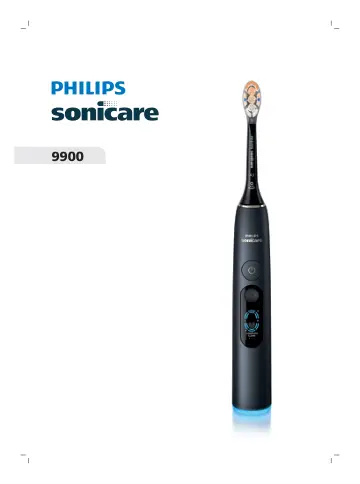
Philips HX9815 user manual
Open PDFOpens the file on documents.philips.com.
Contents
- IMPORTANT SAFETY INSTRUCTIONSp. 5
Only use the product for its intended purpose. Read this information carefully before you use the product and its batteries and accessories, and save it for…
- WARNINGSp. 5
Keep the charging cables, charging travel cases, and wall adapters away from water. - After cleaning, make sure charging cables, charging travel cases, and…
- MEDICAL WARNINGSp. 6
Stop using the appliance and consult your dentist/doctor if excessive or prolonged bleeding occurs after use, or if you experience discomfort or pain during…
- BATTERY SAFETY INSTRUCTIONSp. 6
This appliance contains non-replaceable batteries that are only to be removed by skilled persons. - Accessories supplied may vary for different products. -…
- Storage and transportation conditionsp. 7
Temperature (Transport and Storage) between -20°C to 60°C (-4°F and 140 °F)
- Electromagnetic fields (EMF)p. 7
This Philips appliance complies with all applicable standards and regulations regarding exposure to electromagnetic fields
- Radio Equipment Directivep. 7
Hereby, Philips declares that electric toothbrushes with radio equipment type (Bluetooth®, NFC) are in compliance with Directive 2014/53/EU. - The Bluetooth…
- LIST OF SYMBOLS USEDp. 8
The following symbols may appear on the product: This symbol means read the instructions for use, before using the appliance. Detachable Power Supply Part, if…
- Intended usep. 8
This Sonicare power toothbrush is intended to remove adherent plaque and food debris from the teeth to reduce tooth decay and improve and maintain oral health.…
- Your Philips Sonicarep. 8
Premium All-in-One brush head (A3) 2 BrushSync symbol 3 Handle 4 Power on/off button 5 Confirm Button 6 Display 7 Brushing Feedback Light 8 USB-A charging…
- App Overviewp. 9
App Features The Sonicare app collects information about your brushing habits from smart sensors on your toothbrush, then provides feedback and tips to improve…
- App Featuresp. 9
The Sonicare app collects information about your brushing habits from smart sensors on your toothbrush, then provides feedback and tips to improve your oral…
- Sonicare app - Getting startedp. 9
Download the Sonicare app to your phone. 2 Ensure that your phone's Bluetooth is turned on. 3 Open the Sonicare app and follow the instructions on your phone…
- Getting Startedp. 10
Attaching the Brush Head 1 Align the brush head so the bristles point in the same direction as the front of the handle. 2 Firmly press the brush head down onto…
- Attaching the Brush Headp. 10
Align the brush head so the bristles point in the same direction as the front of the handle. 2 Firmly press the brush head down onto the metal shaft until it…
- Using Your Philips Sonicare Toothbrushp. 11
If you are using your Sonicare toothbrush for the first time, it is normal to feel more vibration than when using a non-electric toothbrush. It is common for…
- Brushing Instructionsp. 11
below for the best experience. To help you transition to your new Sonicare power toothbrush, use a lower intensity level for the first 1-2 weeks then…
- Toothbrush Interfacep. 12
Your Sonicare toothbrush has two buttons and a display with swipe detection to navigate menu options. A- Power Button: Turns on and pauses brushing B- Confirm…
- First Time Setupp. 13
The display on your Philips Sonicare toothbrush wakes up (with enough battery) when you first pick it up. The first screen you will see displays the language…
- Select Preferred Languagep. 13
Swipe left through the Language options and press the Confirm Button when your preferred language is displayed. Swipe right to go back through the previous…
- Navigating Your Displayp. 13
Your Sonicare toothbrush features a swipe display with a menu system that helps you keep track of all its available features and benefits. To navigate the…
- Main Menup. 15
Depending on the status of the brush head, the screen may also display a "Brand New Brush Head" celebration animation. Main Menu When the Main Menu is…
- Selection Menup. 15
The Selection Menu will appear after you confirm your initial choice on the Main Menu. The choices presented are specific to the category you have chosen on…
- Modesp. 17
Your Sonicare toothbrush features up to eight different modes. After you wake it up, your Sonicare toothbrush will default to the Modes screen. To manually…
- Intensitiesp. 21
Our Sonicare toothbrush has three intensity settings: High, Medium, and Low. To change the intensity manually: 1 From the Main Menu, swipe left or right to go…
- Battery Statusp. 21
This Philips Sonicare toothbrush is designed to provide up to 14 days of regular brushing on a full charge. The battery level screen will briefly appear on the…
- Chargingp. 22
on the charger 1 2 1 Plug the USB cord of the charging base into a power supply unit.
- Select Your Instant Feedbackp. 24
Your Sonicare toothbrush provides instant feedback during brushing that helps you enhance your brushing technique, including motions and habits. Only one type…
- Instant Feedback: Coverage (only 9900/9000)p. 25
Your Sonicare toothbrush provides guidance on how long to brush each segment of your mouth, supporting you in achieving complete and even coverage. The light…
- Instant Feedback: Pressure + SenseIQ (only 9900)p. 27
Your Sonicare toothbrush is designed with the Pressure + SenseIQ feature to protect your teeth and gums. If you apply excess pressure for an extended period of…