Loading manual…
Philips BT1216 user manual
Open PDFOpens the file on documents.philips.com.
Contents
- Englishp. 2
Introduction Congratulations on your purchase and welcome to Philips! To fully benefit from the support that Philips offers, register your product at…
- Introductionp. 2
Congratulations on your purchase and welcome to Philips! To fully benefit from the support that Philips offers, register your product at…
- General description (Fig. 1)p. 2
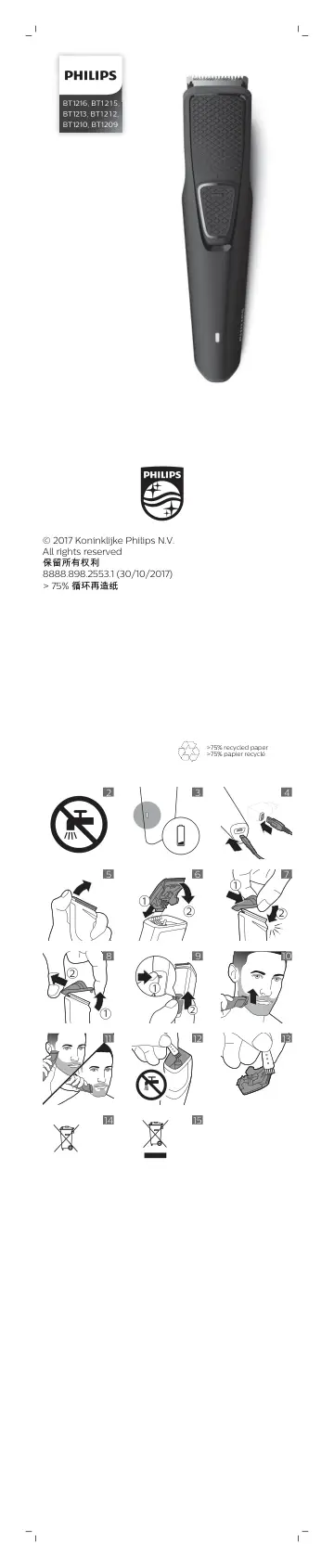
1 Full-size beard trimmer 2 Travel lock 3 On/off button 4 Battery status indicator 5 Socket for micro USB plug 6 Stubble comb (1mm) 7 Beard comb (3mm) 8 Beard…
- Important safety informationp. 2
Read this important information carefully before you use the appliance and its accessories and save it for future reference. The accessories supplied may vary…
- Dangerp. 2
Keep the supply unit dry (Fig. 2). Warning - If you want to charge the appliance from a wall socket, only use supply unit HQ80 (available separately). - The…
- Warningp. 2
If you want to charge the appliance from a wall socket, only use supply unit HQ80 (available separately). - The supply unit contains a transformer. Do not cut…
- Cautionp. 2
This appliance is not washable. Never immerse the appliance in water and do not rinse it under the tap (Fig. 2). - Only use this appliance for its intended…
- Electromagnetic fields (EMF)p. 2
This Philips appliance complies with all applicable standards and regulations regarding exposure to electromagnetic fields. General - The supply unit is…
- Generalp. 2
description (Fig. 1) 1 Full-size beard trimmer 2 Travel lock 3 On/off button 4 Battery status indicator 5 Socket for micro USB plug 6 Stubble comb (1mm) 7…
- Chargingp. 2
When the battery is almost empty, the battery status indicator lights up orange (Fig. 3). - When the appliance is charging, the battery status indicator lights…
- Using the appliancep. 3
Note: This appliance can be used without cord or when it is connected to the wall socket. Note: Switch off and clean the appliance after each use. Detaching…
- Cleaningp. 3
after every use Note: Never use scouring pads, abrasive cleaning agents or aggressive liquids such as gasoline or acetone to clean the product. Clean the…
- Ordering accessoriesp. 3
To buy accessories or spare parts, visit www.shop.philips.com/service or go to your Philips dealer. You can also contact the Philips Consumer Care Center in…
- Recyclingp. 3
This symbol means that this product shall not be disposed of with normal household waste (2012/19/EU) (Fig. 15). - This symbol means that this product contains…
- Removing the rechargeable batteryp. 4
Only remove the rechargeable battery when you discard the product. Before you remove the battery, make sure that the product is disconnected from the wall…
- Warranty and supportp. 4
If you need information or support, please visit www.philips.com/support or read the international warranty leaflet. Warranty restrictions Cutting units are…
- Bahasa Indonesiap. 4
Pendahuluan Selamat atas pembelian Anda dan selamat datang di Philips! Untuk memanfaatkan sepenuhnya dukungan yang ditawarkan Philips, daftarkan produk Anda di…
- Pendahuluanp. 4
Selamat atas pembelian Anda dan selamat datang di Philips! Untuk memanfaatkan sepenuhnya dukungan yang ditawarkan Philips, daftarkan produk Anda di…
- Keterangan umum (Gbr. 1)p. 4
1 Pemangkas jenggot berukuran penuh 2 Travel lock (kunci perjalanan) 3 Tombol daya 4 Indikator status baterai 5 Soket untuk konektor micro USB 6 Sisir cambang…
- Informasi keselamatan pentingp. 4
Baca informasi penting ini dengan saksama sebelum menggunakan alat dan aksesorinya, simpanlah untuk referensi di kemudian hari. Aksesori yang disertakan dapat…
- Bahayap. 4
Usahakan unit catu daya tetap kering (Gbr. 2). Peringatan - Jika Anda ingin mengisi daya peralatan dari stopkontak dinding, hanya gunakan unit catu daya HQ80…
- Peringatanp. 4
Jika Anda ingin mengisi daya peralatan dari stopkontak dinding, hanya gunakan unit catu daya HQ80 (dijual terpisah). - Unit catu daya terdiri atas…
- Perhatianp. 4
Alat ini tidak dapat dicuci. Jangan sekali-kali merendam alat di dalam air atau membilasnya di bawah keran (Gbr. 2). - Hanya gunakan alat ini untuk keperluan…
- Medan elektromagnet (EMF)p. 4
Alat Philips ini mematuhi semua standar dan peraturan yang berlaku terkait paparan terhadap medan elektromagnet. Umum - Unit catu daya cocok untuk tegangan…
- Umump. 4
(Gbr. 1) 1 Pemangkas jenggot berukuran penuh 2 Travel lock (kunci perjalanan) 3 Tombol daya 4 Indikator status baterai 5 Soket untuk konektor micro USB 6 Sisir…
- Pengisian dayap. 5
Ketika baterai hampir habis, lampu indikator status baterai akan menyala oranye (Gbr. 3). - Ketika alat ini sedang diisi daya, lampu indikator status baterai…
- Menggunakan alatp. 5
Catatan: Alat ini dapat digunakan tanpa kabel atau ketika tersambung ke stopkontak. Catatan: Matikan dan bersihkan alat setiap kali selesai digunakan. Memasang…
- Membersihkanp. 5
Bersihkan setiap kali selesai digunakan Catatan: Jangan sekali-kali menggunakan sabut gosok, bahan pembersih abrasif, atau cairan agresif seperti bensin atau…
- Memesan aksesorip. 6
Untuk membeli aksesori atau suku cadang, buka www.shop.philips.com/service atau kunjungi dealer Philips terdekat. Anda juga dapat menghubungi Pusat Layanan…
- Mendaur ulangp. 6
Jangan membuang produk bersama limbah rumah tangga biasa jika sudah tidak bisa dipakai lagi, tetapi serahkan ke tempat pengumpulan barang bekas yang resmi…