Loading manual…
Philips RQ1087 user manual
Open PDFOpens the file on documents.philips.com.
Contents
- Introductionp. 4
Thank you for buying this Philips shaver. Please read this user manual, as it contains information about the wonderful features of this shaver as well as some…
- Importantp. 4
Read this user manual carefully before you use the shaver, the Jet Clean System and the Power Pod. Save the user manual for future reference. Danger Make sure…
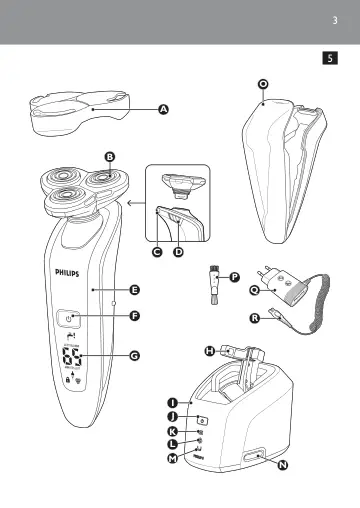
- Overview (Fig. 5)p. 5
- The displayp. 6
Before you use the shaver for the first time, remove the protective foil from the display. The five shaver types (RQ1090, RQ1062, RQ1060, RQ1052 and RQ1050)…
- Chargingp. 9
- Using the shaverp. 11
Shaving 1 Press the on/off button once to switch on the shaver. The display lights up for a few seconds. 2 Move the shaving heads over your skin. Make both…
- Cleaning and maintenancep. 12
Never use scouring pads, abrasive cleaning agents or aggressive liquids such as petrol or acetone to clean the appliance. The best and most hygienic way to…
- Storagep. 15
There are two ways to store the shaver or to take it with you when you travel: put the shaver in the Power Pod or in the Jet Clean system. Make sure the…
- Replacementp. 16
Replace the shaving unit when the shaving unit symbol appears on the display. Replace a damaged shaving unit right away. For maximum shaving performance, we…
- Environmentp. 16
Do not throw away the appliances with the normal household waste at the end of their life, but hand them in at an official collection point for recycling. By…
- Guarantee & servicep. 17
If you need service or information or if you have a problem, please visit the Philips website at www.philips.com or contact the Philips Consumer Care Centre in…
- Frequently asked questionsp. 17
1 Why doesn’t the shaver shave as well as it used to? The Jet Clean System may not have cleaned the shaver properly, because the cleaning fluid in the cleaning…