Loading manual…
Philips HQ8253 user manual
- Type
- User manual
- Language
- English
- Pages
- 240
- Category
- Shavers & trimmers
- Models
- HQ8200HQ8240HQ8241HQ8250HQ8253HQ8255
Open PDFOpens the file on documents.philips.com.
Contents
- Introductionp. 4
Congratulations on your purchase and welcome to Philips! To fully benefit from the support that Philips offers, register your product at www.philips.…
- Importantp. 4
Read this user manual carefully before you use the appliance. Save the user manual for future reference. Danger -- Make sure the adapter does not get wet.…
- Dangerp. 4
Make sure the adapter does not get wet. Warning -- Be careful with hot water. Always check if the water is not too hot, to prevent your hands from getting…
- Warningp. 4
Be careful with hot water. Always check if the water is not too hot, to prevent your hands from getting burnt. -- The adapter contains a transformer. Do not…
- Cautionp. 4
- Compliance with standardsp. 5
The shaver complies with the internationally approved IEC safety regulations and can be safely cleaned under the tap. -- This Philips appliance complies with…
- Generalp. 5
The adapter transforms 100-240 volts to a safe low voltage of less than 24 volts. -- Noise level: Lc = 64 dB [A] English 7
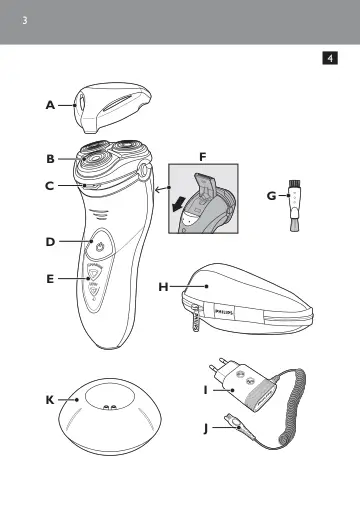
- Overview (Fig. 4)p. 6
A Protection cap B Shaving unit C Shaving unit release button D Shaver on/off button with power-on symbol E Display (all types except HQ8200) F Trimmer G…
- The display (all types except HQ8200)p. 6
The HQ8251, HQ8250, HQ8241 and HQ8240 have different displays, which are shown in the figures below. -- HQ8251/HQ8250 -- HQ8241/HQ8240 Charging indication…
- Charging indicationp. 6
Charging takes approx. 60 minutes. A fully charged shaver provides up to 17 cordless shaves. English 8
- ’Battery fully charged’ indicationp. 7
When the battery is fully charged, the CHARGE light starts flashing. Note: When you disconnect the shaver from the mains, the CHARGE light stops flashing.…
- ’Battery low’ indication (HQ8251/HQ8250 only)p. 7
Note: If the rechargeable battery runs low during shaving, you can connect the shaver to the mains to finish the shave. -- When the battery is almost empty…
- Charging (all types except HQ8200)p. 7
Note: The HQ8200 is not rechargeable. HQ8251/HQ8250: Charge the shaver when the LOW light goes on. HQ8241/HQ8240: Charge the shaver when the motor stops or…
- Charging the shaverp. 8
Do not charge the shaver in a closed pouch. 1 Put the small plug in the shaver. 2 Put the adapter in the wall socket. ,, The CHARGE light goes on. Using the…
- Using the shaverp. 8
Note: The HQ8200 can only be used directly from the mains. Note for all types except HQ8200: You can also use the appliance without charging. Simply connect…
- Shavingp. 9
1 HQ8200: Put the small plug in the shaver and put the adapter in the wall socket. 2 Press the on/off button once to switch on the shaver. ,, The power-on…
- Trimmingp. 9
You can use the trimmer to groom your sideburns and moustache. 1 HQ8200: Put the small plug in the shaver and put the adapter in the wall socket. 2 Press the…
- Cleaning and maintenancep. 10
Never use scouring pads, abrasive cleaning agents or aggressive liquids such as petrol or acetone to clean the appliance. -- Clean the shaver after every shave…
- Cleaning the shaving unit under the tapp. 10
1 Switch off the shaver and disconnect it from the mains. English 12
- Cleaning the shaving unit with the brush suppliedp. 11
- Cleaning the trimmer with the brush suppliedp. 12
2 Press the release button to open the shaving unit. 3 Turn the lock anticlockwise (1) and remove the retaining frame (2). 4 Clean the shaving heads with the…
- Storagep. 13
There are several ways to store the shaver or to take it with you when you travel: -- put the protection cap on the shaver to prevent damage. -- store the…
- Replacementp. 13
- Accessoriesp. 14
The following accessories are available: -- HQ9 Philips Shaving heads -- HQ110 Philips Shaving Head Cleaning Spray (not available in some countries) -- HQ8010…
- Environmentp. 15
Do not throw away the appliance with the normal household waste at the end of its life, but hand it in at an official collection point for recycling. By doing…
- Removing the rechargeable shaver battery (all types except HQ8200)p. 15
Only remove the rechargeable battery when you discard the shaver. Make sure the rechargeable battery is completely empty when you remove it. 1 Disconnect the…
- Guarantee & servicep. 17
If you need service or information or if you have a problem, please visit the Philips website at www.philips.com or contact the Philips Consumer Care Centre in…
- Guarantee restrictionsp. 17
The shaving heads (cutters and guards) are not covered by the terms of the international guarantee because they are subject to wear. Troubleshooting 1 The…
- Troubleshootingp. 17
1 The shaver does not shave as well as it used to. -- The shaving heads may be damaged or worn. Replace the shaving heads (see chapter ‘Replacement’). -- Long…