Loading manual…
APC Power-Saving Back-UPS Pro (BR900G-FR) user manual
- Type
- User manual
- Language
- English
- Pages
- 8
- Models
- BR900G-FR
Open PDFOpens the file on objects.icecat.biz.
Contents
- Inventoryp. 1
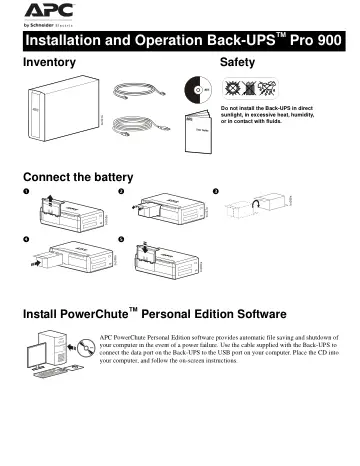
Safety Do not install the Back-UPS in direct sunlight, in excessive heat, humidity, or in contact with fluids. bu001a bu055a bu057a bu059a bu058a…
- Safetyp. 1
Do not install the Back-UPS in direct sunlight, in excessive heat, humidity, or in contact with fluids. bu001a bu055a bu057a bu059a bu058a bu060a
- Connect the batteryp. 1
Install PowerChute™ Personal Edition Software APC PowerChute Personal Edition software provides automatic file saving and shutdown of your computer in the…
- Install PowerChute™ Personal Edition Softwarep. 1
APC PowerChute Personal Edition software provides automatic file saving and shutdown of your computer in the event of a power failure. Use the cable supplied…
- Connect the equipmentp. 2
Battery Backup and Surge Protected outlets When the Back-UPS is receiving input power, the Battery Backup with Surge Protection outlets will supply power to…
- Battery Backup and Surge Protected outletsp. 2
When the Back-UPS is receiving input power, the Battery Backup with Surge Protection outlets will supply power to connected equipment. During a power outage or…
- Master and Controlled outletsp. 2
To conserve electricity, when the device connected to Master Outlet goes into Sleep or Standby mode, or turns Off, the Controlled device(s) will shut down as…
- Operationp. 3
Back-UPS Pro 900 3 Operation
- Power-Saving Functionp. 3
To conserve electricity, configure the Back-UPS to recognize a Master device, such as a desktop computer or an A/V receiver, and Controlled peripheral devices…
- Power-Saving Displayp. 3
The display interface can be configured to be continuously illuminated, or to save energy, it can be configured to darken after a period of inactivity. 1. Full…
- Unit sensitivityp. 3
Adjust the sensitivity of the Back-UPS to control when it will switch to battery power; the higher the sensitivity, the more often the Back-UPS will switch to…
- Front Panel Buttons and Display Interfacep. 4
Use the three buttons on the front panel of the Back-UPS and the display interface to configure the Back-UPS. Front panel Mute button Power On/Off button…
- Warnings and System Faultsp. 5
- Audible Warningsp. 5
- Warning Iconsp. 5
System Faults The Back-UPS will display these fault messages. For faults F01 and F02, contact APC Technical Support. Four Beeps Every 30 Seconds Back-UPS is…
- System Faultsp. 5
Audible Warnings Warning Icons System Faults The Back-UPS will display these fault messages. For faults F01 and F02, contact APC Technical Support. Four Beeps…
- Function Button Quick-Referencep. 6
Function Button Timing (seconds) UPS Status Description Power Power On 0.2 Off Press POWER to start receiving input utility power. If A/C input power is not…
- Troubleshootingp. 7
Problem Possible Cause Corrective Action Back-UPS will not switch on. The Back-UPS is not connected to utility power. Ensure that the Back-UPS is securely…
- Specificationsp. 8
- Replacement Batteryp. 8
The battery cartridge typically lasts 3 to 6 years, a shorter period if subjected to frequent outages or elevated temperatures. Battery replacement part for…
- Servicep. 8
If the Back-UPS arrived damaged, notify the carrier. If the Back-UPS requires service, do not return it to the dealer. 1. Consult the Troubleshooting section…
- Warrantyp. 8
information is available at the APC Web site, www.apc.com. © 2012 APC by Schneider Electric. All trademarks are owned by Schneider Electric Industries S.A.S.…
- APC Worldwide Customer Supportp. 8