Loading manual…
APC Back-UPS Pro (BR550GI) user manual
- Type
- User manual
- Language
- English
- Pages
- 8
- Models
- BR550GI
Open PDFOpens the file on objects.icecat.biz.
Contents
- Inventoryp. 1
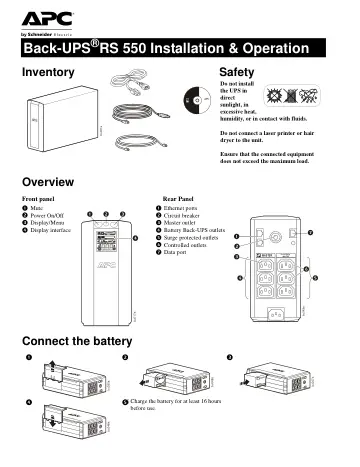
Safety Do not install the UPS in direct sunlight, in excessive heat, humidity, or in contact with fluids. Do not connect a laser printer or hair dryer to the…
- Safetyp. 1
Do not install the UPS in direct sunlight, in excessive heat, humidity, or in contact with fluids. Do not connect a laser printer or hair dryer to the unit.…
- Overviewp. 1
Connect the battery Inventory Safety Do not install the UPS in direct sunlight, in excessive heat, humidity, or in contact with fluids. Do not connect a laser…
- Connect the batteryp. 1
Inventory Safety Do not install the UPS in direct sunlight, in excessive heat, humidity, or in contact with fluids. Do not connect a laser printer or hair…
- Connect the equipmentp. 2
1.Connect equipment to the Battery Backup and Surge Protection outlets. When the Back-UPS is receiving AC power, these outlets will supply power to connected…
- Operationp. 2
Connect the equipment Connect the equipment 1.Connect equipment to the Battery Backup and Surge Protection outlets. When the Back-UPS is receiving AC power…
- Configurationp. 3
Power-Saving Master and Controlled outlets To conserve electricity, configure the Back-UPS to recognize a Master device, such as a desktop computer or an A/V…
- 156-288 Vacp. 4
- 176-282 Vacp. 4
176-276 Vac Input voltage is extremely low or high. (Not recommended for computer loads.) The Back-UPS frequently switches to battery power. The connected…
- 176-276 Vacp. 4
Input voltage is extremely low or high. (Not recommended for computer loads.) The Back-UPS frequently switches to battery power. The connected equipment is…
- 0.2p. 5
Off Press POWER to start receiving input utility power. If A/C input power is not available, the unit will run
- Offp. 5
Press POWER to start receiving input utility power. If A/C input power is not available, the unit will run
- Onp. 5
- 0.2p. 5
- Onp. 5
- 0.2p. 5
- Onp. 5
- Offp. 5
- Onp. 5
- 0.2p. 5
- Onp. 5
and Operation 5 Function Button Quick-Reference Function Button Timing (seconds) UPS Status Description Power Power On 0.2 Off Press POWER to start receiving…
- Faultp. 5
Reset 2 Fault After a fault has been identified, press POWER to remove the visual indication and return to standby status.