Loading manual…
MSI X299 TOMAHAWK AC (7B05-002R) user manual
- Type
- User manual
- Language
- English
- Pages
- 131
- Category
- Motherboards
- Models
- 7B05-002R
Open PDFOpens the file on objects.icecat.biz.
Contents
- Unpackingp. 1
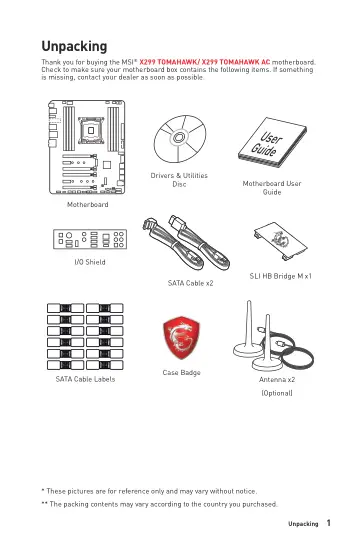
Thank you for buying the MSI® X299 TOMAHAWK/ X299 TOMAHAWK AC motherboard. Check to make sure your motherboard box contains the following items. If something…
- Safety Informationp. 2
y The components included in this package are prone to damage from electrostatic discharge (ESD). Please adhere to the following instructions to ensure…
- Quick Startp. 3
Intel® LGA 2066 CPU DDR4 Memory Graphics Card SATA Hard Disk Drive SATA DVD Drive A Package of Screws Phillips Screwdriver Chassis Power Supply Unit CPU Fan…
- Specificationsp. 16
CPU y Supports Intel® Core™ X-Series Processor Family for LGA2066 Socket Chipset Intel® X299 Chipset Memory y 8x DDR4 memory slots, support up to 128GB* …
- Block Diagramp. 22
- Rear I/O Panelp. 23
y Clear CMOS button - Power off your computer. Press and hold the Clear CMOS button for about 5-10 seconds to reset BIOS to default values. y BIOS FLASHBACK+…
- Overview of Componentsp. 27
- Onboard LEDsp. 49
EZ Debug LEDs These LEDs indicate the status of key components during booting process. When an error is occurred, the corresponding LED stays lit until the…
- BIOS Setupp. 54
The default settings offer the optimal performance for system stability in normal conditions. You should always keep the default settings to avoid possible…
- Software Descriptionp. 76
Installing Windows® 10 1. Power on the computer. 2. Insert the Windows® 10 disc into your optical drive. 3. Press the Restart button on the computer case. 4.…
- RAID Configurationp. 115
Below are the different types of a RAID. RAID 0 breaks the data into blocks which are written to separate hard drives. Spreading the hard drive I/O load across…
- Intel® Optane™ Memory Configurationp. 123
Intel® Optane™ memory can accelerate the Windows 10 64bit operating system. This section describes how to install and remove the Intel® Optane™ memory. System…
- Troubleshootingp. 127
Before sending the motherboard for RMA repair, try to go over troubleshooting guide first to see if your got similar symptoms as mentioned below. The power is…
- BIOS_SW1: Multi-BIOS Switchp. 46
This motherboard has two built-in BIOS ROMs (Labeled A and B, default BIOS ROM is A). If one is crashed, you can shift to the other for booting by sliding the…
- CPU_FAN1, PUMP_FAN1, SYS_FAN1~4: Fan Connectorsp. 44
Fan connectors can be classified as PWM (Pulse Width Modulation) Mode or DC Mode. PWM Mode fan connectors provide constant 12V output and adjust fan speed with…
- CPU_PWR1, ATX_PWR1: Power Connectorsp. 40
These connectors allow you to connect an ATX power supply. VRAID1: Virtual RAID on CPU Connector This connector allows you to connect the specific Intel…
- CPU Socketp. 29
Introduction to the LGA 2066 CPU The surface of the LGA2066 CPU has four alignment keys and a yellow triangle to assist in correctly lining up the CPU for…
- DIMM Slotsp. 30
- JAUD1: Front Audio Connectorp. 45
- JBAT1: Clear CMOS (Reset BIOS) Jumperp. 47
There is CMOS memory onboard that is external powered from a battery located on the motherboard to save system configuration data. If you want to clear the…
- JCI1: Chassis Intrusion Connectorp. 45
This connector allows you to connect the chassis intrusion switch cable. Normal (default) Trigger the chassis intrusion event Using chassis intrusion detector…
- JFP1, JFP2: Front Panel Connectorsp. 41
- JLED1: RGB LED connectorp. 48
These connectors allow you to connect the 5050 RGB LED strips. Important y This connector supports 5050 RGB multi-color LED strips (12V/G/R/B) with the maximum…
- JTBT1: Thunderbolt Add-on Card Connectorp. 44
This connector allows you to connect the add-on Thunderbolt I/O card. 1 1 FORCE_PWR 2 SCI_EVENT 3 SLP_S3# 4 SLP_S5# 5 Ground
- JTPM1: TPM Module Connectorp. 43
This connector is for TPM (Trusted Platform Module). Please refer to the TPM security platform manual for more details and usages.
- JUSB1~2: USB 2.0 Connectorsp. 43
- JUSB3, JUSB4: USB 3.1 Gen1 Connectorsp. 41
- JUSB5: USB 3.1 Gen2 Type-C Connectorp. 42
This connector allows you to connect USB 3.1 Gen2 Type-C connector on the front panel. The connector possesses a foolproof design. When you connect the cable…
- M2_1~2: M.2 Slots (Key M)p. 37
2 3 30° 5 Installing M.2 module 1. Remove the screw from the base screw. 2. Remove the base screw. 3. Tighten the base screw into the hole of the distance to…
- PCI_E1~6: PCIe Expansion Slotsp. 33
PCI_E1: PCIe 3.0 x16 (CPU lanes) PCI_E2: PCIe 3.0 x1 (PCH lanes) PCI_E3: PCIe 3.0 x4 (PCH lanes) PCI_E4: PCIe 3.0 x16 (CPU lanes) PCI_E5: PCIe 3.0 x1 (PCH…